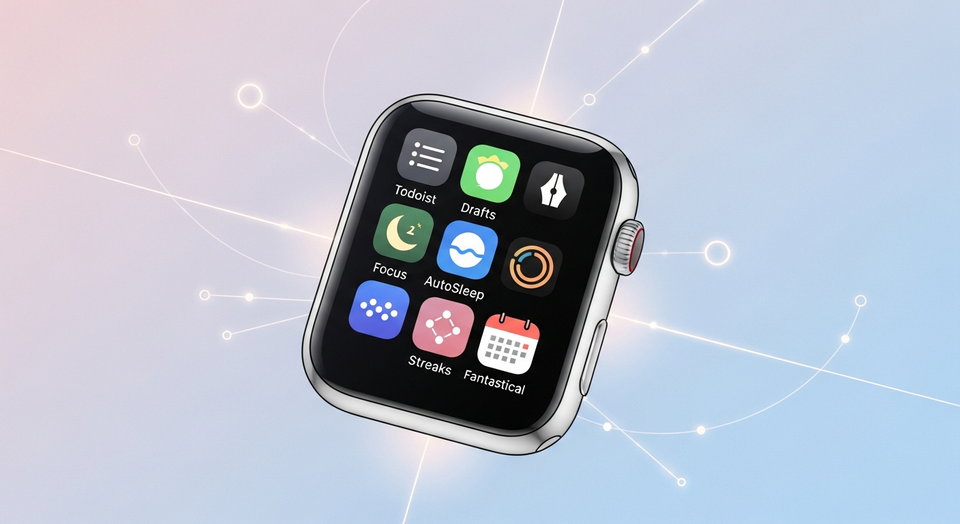
The Apple Watch is best known for health and fitness tracking, but it can also be a surprisingly effective productivity tool—especially if you’re trying to avoid getting pulled into distractions on your iPhone. With the right apps, quick wrist interactions can replace many “just checking” moments that turn into minutes of scrolling.
Apple includes basic options like Reminders and Calendar, yet a number of third-party apps go further by offering richer task management, faster note capture, structured focus timers, sleep insights, habit tracking, and advanced calendaring. Below is a practical, app-by-app guide to some of the best Apple Watch apps for boosting your productivity, including what each one is good for and what it costs.
Why productivity apps work well on Apple Watch
Productivity on a watch is different from productivity on a phone or laptop. The small screen and limited interaction model can be an advantage: it encourages short, intentional check-ins instead of long sessions. In practice, Apple Watch productivity tends to shine in a few scenarios:
- Capturing something quickly: a task, a reminder, or a short note before you forget it.
- Checking what matters at a glance: the next task, your day’s progress, or an upcoming meeting.
- Staying on track without picking up your phone: timers and nudges that help you keep working.
- Building routines: habit trackers that encourage consistency through daily checklists.
The apps below lean into those strengths while keeping actions simple enough to do from your wrist.
Todoist

Todoist is a strong choice if you want full-featured task management on Apple Watch without constantly reaching for your iPhone. From the watch app, you can create and edit tasks, organize tasks into projects, mark items complete, and set reminders. Input options include voice commands as well as typing with the keyboard.
Todoist is particularly useful in “in-between” moments—like checking a grocery list while shopping, capturing a quick reminder mid-walk, or confirming what’s next in your day without opening your phone. It’s also designed to surface progress in a watch-friendly way. You can add complications to your watch face to show, for example, your next task or the percentage of tasks you’ve completed for the day, making it easier to stay aware of your workload without a full app open.
Pricing: Todoist is free, with a $4 monthly subscription tier that adds features such as custom task reminders, an AI assistant, a calendar layout, and more.
Drafts

Because Apple Watch doesn’t include a dedicated Notes app, Drafts can fill the role of a lightweight notepad you can use without pulling out your phone. The app supports multiple input methods that work well on a watch: voice dictation, the watchOS Scribble feature, or the keyboard.
Drafts is built around fast capture. On Apple Watch, it defaults to a blank note so you can immediately drop in an idea, a sentence, a meeting takeaway, or a to-do—without navigating menus that might break your concentration. Drafts also syncs with your iPhone, and its watch interface displays how many drafts you have along with the number of flagged drafts, which helps you quickly return to the items you marked as important.
Once captured, you can keep notes loose and unstructured or organize them into folders, depending on whether you prefer a “single inbox” for everything or a more deliberate system.
Pricing: Drafts is free. A $1.99 monthly subscription adds extra features such as themes and the ability to send your emails to the app.
Focus

If your productivity problem is less about remembering tasks and more about staying locked in while you do them, Focus is designed as a dedicated productivity timer. It encourages you to work in smaller blocks called “Focus Sessions,” helping you take on one task at a time instead of multitasking across everything at once.
Using a timer on Apple Watch can be a practical way to reduce phone-driven distractions. Rather than keeping your iPhone on your desk (and inevitably checking it), you can glance at your wrist to see how much time remains in a session and then go right back to what you were doing. Focus also prompts you to take breaks between sessions, reinforcing a rhythm of work and recovery that can be easier to maintain than open-ended “I’ll work until I’m done” plans.
Pricing: Focus is available for $7.99 per month.
AutoSleep

Sleep isn’t typically framed as a “productivity app” category, but better rest is often the foundation for better focus and decision-making. AutoSleep is widely used on Apple Watch for sleep tracking, offering a detailed view into sleep quality, heart rate, sleep consistency, and other metrics. It also tracks how long it takes you to fall asleep and estimates sleep efficiency, giving you more context than simply “how many hours did I sleep?”
AutoSleep presents much of its information in a clock-style view with sleep rings, designed to feel familiar to Apple Watch users who already understand Activity Rings. That makes it easier to interpret the data quickly—useful when you’re trying to gauge whether your current routine is actually working.
A key feature is its “readiness” score, which estimates how mentally and physically prepared you are for the day ahead based on your sleep, similar to the approach used in the Oura Ring’s app. AutoSleep can also recommend an ideal bedtime to help you catch up when you’re behind on rest.
Pricing: AutoSleep costs a one-time fee of $5.99.
Streaks

For many people, productivity is less about doing more tasks and more about doing the right tasks consistently. Streaks is built around habit formation and progress tracking through a simple mechanism: complete a task and your streak continues; miss it and the streak returns to zero.
You can track up to 24 habits—examples include flossing your teeth, practicing a new language, and eating healthy. The Apple Watch angle is straightforward and effective: a quick look at your wrist shows what you still need to do today, how you’re progressing, and lets you mark tasks complete without opening your phone.
Streaks also supports tasks that aren’t meant to happen daily. That matters because many real-world routines are weekly or weekday-based—such as walking to work Monday to Friday, going to the gym three days a week, or avoiding junk food on weekends.
Pricing: Streaks is available for a one-time fee of $5.99.
Fantastical
Fantastical is a popular calendar app on Apple platforms, and its Apple Watch support can make it easier to keep up with meetings and time blocks when you’re away from your desk. A calendar-focused watch app is most valuable when it reduces friction: checking what’s coming up next, confirming event details, and staying aware of schedule changes without diving into your phone.
Because the source report’s Fantastical section is truncated, specific features and pricing details beyond its inclusion are not available in the provided text. Still, in the context of Apple Watch productivity, Fantastical belongs in the “plan and review” category: it’s about keeping your day structured and visible with as few taps as possible.
How to choose the best Apple Watch productivity app for your needs
These apps work best when you match them to your biggest bottleneck. If you’re not sure where to start, consider this quick mapping:
- You forget tasks or lose track of priorities: Todoist
- You have ideas but don’t capture them fast enough: Drafts
- You know what to do but can’t stay focused: Focus
- You’re tired and your output suffers: AutoSleep
- You struggle with consistency: Streaks
- Your day feels chaotic or meeting-heavy: Fantastical
It can also help to keep your system small. Many people get better results by committing to one “capture” tool (tasks or notes), one “execution” tool (timer or focus method), and one “review” surface (watch face complications that show the next action).
Conclusion
The best Apple Watch apps for boosting your productivity are the ones that keep you moving without pulling you into phone distractions. Whether you need better task management, faster note capture, a focused work timer, sleep insights, or habit accountability, the right watch-first workflow can make daily progress feel simpler and more automatic.
This article is based on reporting originally published by TechCrunch.
Related Articles
- Apple Watch SE 3 vs. Series 11: Is the SE 3 a Good Deal in 2025?
- Best AI-Powered Dictation Apps of 2025: Top Voice-to-Text Tools for Faster Writing
- 14 Fintech, Real Estate, and Proptech Startups to Watch From TechCrunch Disrupt Startup Battlefield
Based on reporting originally published by TechCrunch. See the sources section below.
Sources
- TechCrunch
- https://todoist.com/
- https://docs.getdrafts.com/
- https://apps.apple.com/us/app/focus-timer-for-productivity/id975017240?platform=appleWatch
- https://autosleepapp.tantsissa.com/
- https://streaksapp.com/
- https://flexibits.com/fantastical
- https://apps.apple.com/us/app/things-3/id904237743?platform=appleWatch
- https://apps.apple.com/us/app/structured-daily-planner/id1499198946